Everything this blog can render
A reference post that exercises every piece of Markdown syntax the site supports — headings, code, math, callouts, tables, footnotes, images and the awkward edge cases — so regressions are obvious.
This post exists to be looked at, not read. Every construct the build pipeline handles appears below; if something breaks after a dependency bump, it breaks here first.
Text and inline marks
Regular paragraph text, with bold, italic, bold italic,
strikethrough, inline code, a link to another post,
an external link that opens in a new tab, H2O with a
subscript, x2 with a superscript, and a ⌘ + K key hint.
A long paragraph to check the measure and line height. The reading column is capped at 44rem because lines longer than roughly 75 characters cost you your place on every return sweep. Vertical rhythm is set from a single spacing scale so that the gap between a paragraph and the heading above it is always larger than the gap between two paragraphs — the standard trick for making structure legible without drawing any boxes.
A blockquote, for when someone else said it better.
It can hold multiple paragraphs, and
code, and a link.
Callouts
Six flavours, written as :::name{title="..."} container directives.
Code
Syntax highlighting comes from Shiki with two themes compiled in, so blocks recolor with the light/dark toggle instead of staying one fixed palette.
use std::collections::HashMap;

/// Counts token frequencies, because every systems blog needs one of these.
pub fn tally(tokens: &[&str]) -> HashMap<String, usize> {
    let mut counts = HashMap::with_capacity(tokens.len() / 4);
    for token in tokens {
        *counts.entry(token.to_lowercase()).or_insert(0) += 1;
    }
    counts
}

#[cfg(test)]
mod tests {
    use super::*;

    #[test]
    fn counts_case_insensitively() {
        let counts = tally(&["A", "a", "b"]);
        assert_eq!(counts["a"], 2);
    }
}
type Result<T, E = Error> = { ok: true; value: T } | { ok: false; error: E };
async function fetchJson<T>(url: string, signal?: AbortSignal): Promise<Result<T>> {
try {
const response = await fetch(url, { signal });
if (!response.ok) {
return { ok: false, error: new Error(`HTTP ${response.status}`) };
}
return { ok: true, value: (await response.json()) as T };
} catch (error) {
return { ok: false, error: error instanceof Error ? error : new Error(String(error)) };
}
}A very wide line, to confirm that code blocks scroll horizontally rather than forcing the whole page to:
python -m vllm.entrypoints.openai.api_server --model meta-llama/Llama-3.1-8B-Instruct --tensor-parallel-size 2 --max-model-len 8192 --gpu-memory-utilization 0.92 --enable-chunked-prefillA block with no language, which stays unhighlighted:
plain text, monospaced, no tokensMath
Inline math sits in the sentence: the attention score for query and key is , and softmax normalizes over .
Display math gets its own block:
Multi-line alignment works too:
And a deliberately wide equation, which scrolls inside its own block rather than overflowing the page:
Because $ is meaningful, an escaped dollar sign renders literally: $42.
Tables
| Component | Where it lives | Notes |
|---|---|---|
| Markdown pipeline | astro.config.mjs |
Sätteri processor + four plugins |
| Math rendering | src/markdown/katex.mjs |
KaTeX, at build time |
| Callouts | src/markdown/callout.mjs |
::: container directives |
| Figures | src/markdown/figure.mjs |
Image title becomes the caption |
| Theme tokens | src/styles/global.css |
One block per theme |
A wide table, to confirm the horizontal scroll wrapper:
| Strategy | p50 TTFT | p99 TTFT | p50 TPOT | p99 TPOT | Throughput | Memory | Notes |
|---|---|---|---|---|---|---|---|
| Static batching | 180 ms | 2400 ms | 22 ms | 24 ms | 1.00× | 42 GiB | Tail-dominated |
| Continuous batching | 96 ms | 410 ms | 24 ms | 310 ms | 2.30× | 44 GiB | Prefill stalls decode |
| + chunked prefill | 104 ms | 240 ms | 27 ms | 61 ms | 2.24× | 44 GiB | Best tail/throughput trade |
| + prefix cache | 38 ms | 210 ms | 27 ms | 58 ms | 2.61× | 51 GiB | Shared system prompt |
Lists
Ordered, with nesting:
- Read the profile before changing anything.
- Establish the limiting resource.
- Compute-bound: look at kernels.
- Memory-bound: look at the cache.
- Neither: look at the scheduler.
- Change exactly one thing.
- Re-measure.
Task lists:
- Set up the build
- Wire up math and code highlighting
- Write more than three posts
- Resist redesigning instead of writing
Definition-style content via nested lists:
- TTFT — time to first token, dominated by prefill.
- TPOT — time per output token, dominated by decode step latency.
- Goodput — throughput counting only requests that met their latency target.
Images
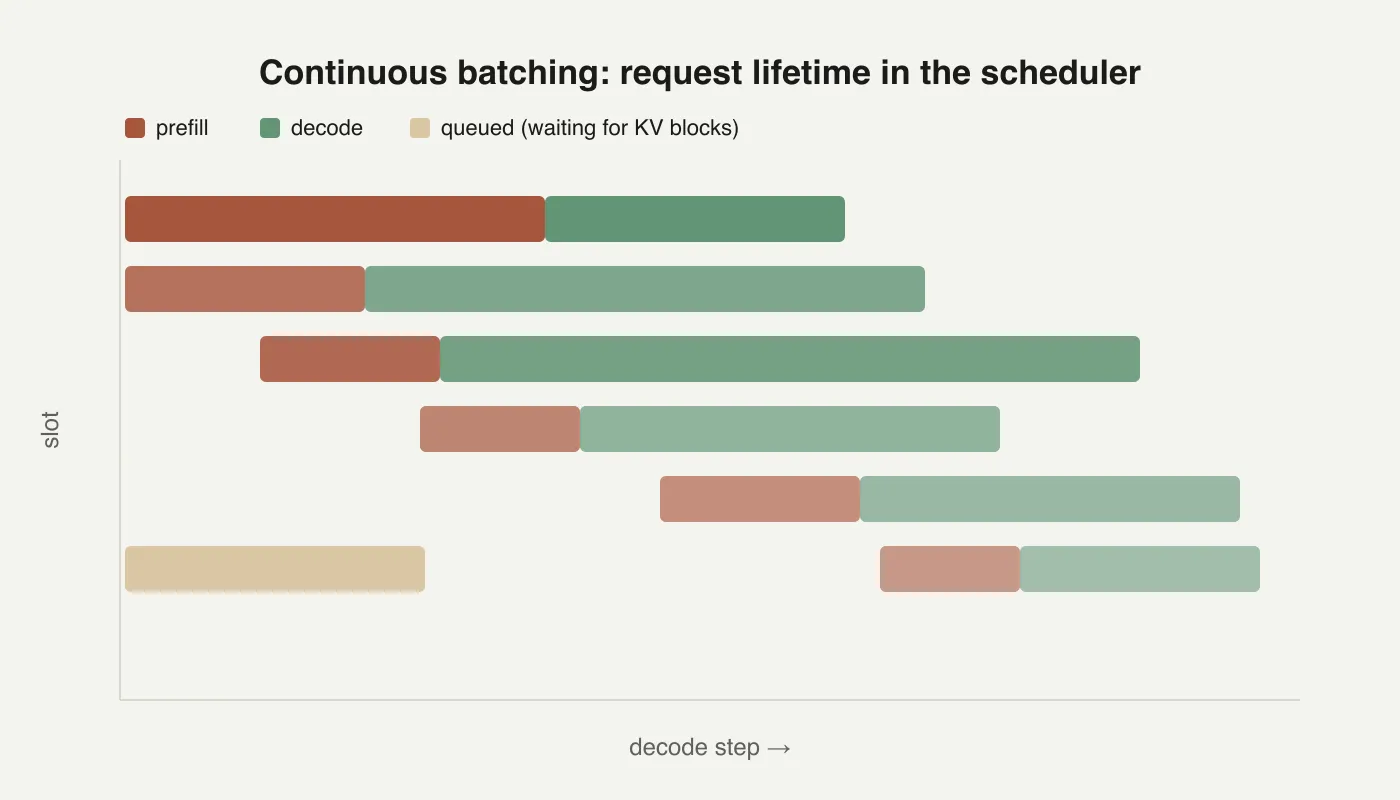
A standalone image becomes a <figure>; the Markdown title becomes the caption,
and the alt text stays on the <img> for screen readers.
Collapsible sections
Raw HTML works when Markdown isn't enough
Inline HTML passes through, so <details> blocks, <sup>, and the occasional
<table> with a rowspan are all available when the Markdown equivalent doesn't
exist.
Footnotes
Footnotes are collected at the bottom with back-links1, and can be referenced more than once1 or hold their own formatting2.
Horizontal rule
That's everything.